"Interlocking BatterySaver by Wi-Fi" - v2.0.20 Release Notes (2023/08/29)
It may take a few days for the latest version to become available from the Microsoft Store.
〇 Visual Update
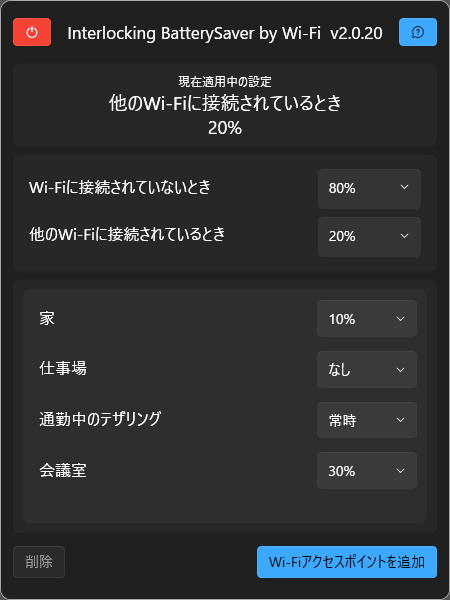
The overall visuals have been changed. This transitions the theme from the Windows 8 generation (Metro UI) to the Windows 11 generation (Fluent UI), increasing consistency with the system.
Additionally, overall operations have been made lighter, and memory usage while the main screen is displayed has been reduced by approximately 10%.
〇 Feature Additions
・ Implementation of a function to check currently applied access point rules
You can now check the currently applied access point rules from the app's main screen.
・ Tooltip display
When hovering the mouse pointer over buttons on each app screen, helpful information for operations will be displayed.
・ Addition of buttons to the main screen
A button to terminate the app's operation (resident process) has been added to the main screen.
・ Flyout display
Pop-ups (flyouts) will now be displayed to notify you when an access point is added, updated, or deleted.
〇 Feature Updates
・ Immediate application of settings to the system
After changing settings in the app, the changes will now be immediately reflected in the system.
・Changed the behavior of the notification icon
When clicking the notification icon, the main screen is now displayed directly instead of a menu.
・Adjustments to various texts
Various texts have been revised to be easier to understand.
・Official support for English localization
While English localization was included in the initial version (v1.1.8), official support begins from this version (affects only the app manifest and store registration information).
・Always-on-top display for the main screen
Settings have been configured to keep the main screen fixed at the front while it is displayed.
・Automatic updates for the access point list
When the contents of the list are modified, the changes are now automatically reflected.
・Improved notification icon initialization process
Speed up the display of the notification icon.
・Improved main screen initialization process
Reduced the time from clicking the notification icon to the main screen being displayed.
〇 Bug Fixes
・Improved application automatic restart process
The code has been revised to ensure that the restart process is performed stably.
・Improved notification icon stability
Suppressed an error that occasionally occurred when clicking the notification icon during an app state transition.
・Improved list update functionality
Improved the behavior when the list contents are modified multiple times.
〇 Changes to internal specifications
・.NET version upgrade
Updated the application's target framework to .NET 7.0. Resident memory usage has significantly decreased (from 35MB to 10MB in the verification environment). There is no change to the supported OS versions due to this update.